
Workflow & Process Improvement, AI & Automation, Business Operations, Operational Excellence
Before You Automate: Is Your Small-Business Workflow Ready for AI?
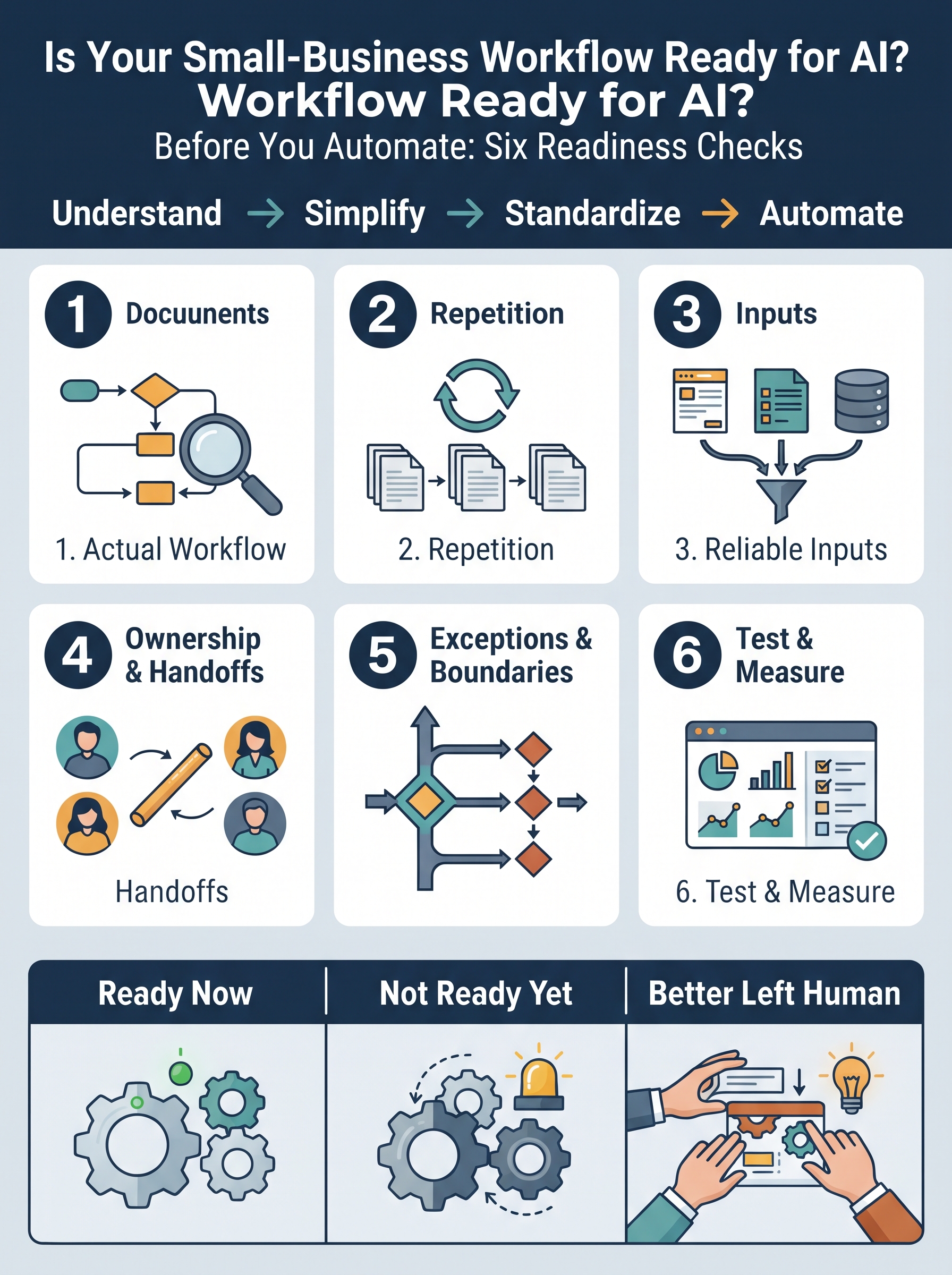

Small businesses are being encouraged to automate more of their work with AI.
And in many cases, that makes sense.
AI can classify incoming requests, summarize documents, draft responses, extract information, prepare reports, route work, monitor activity, and help employees complete repetitive tasks faster.
But there is a question that should come before choosing the tool:
Is the workflow actually ready to be automated?
That is a different question from asking whether AI can perform the task.
A tool may be perfectly capable of automating part of a workflow while the workflow itself is still unclear, inconsistent, dependent on undocumented judgment, or full of exceptions nobody has defined.
When that happens, automation may not remove the confusion.
It may simply move the confusion faster.
Automation Readiness Is a Workflow Question
I have written before that automation should not be the first step.
The better sequence is:
Understand → Simplify → Standardize → Automate
But even after a workflow has been reviewed, there is still an important decision to make:
Is this particular workflow ready for automation now?
A business does not need every process to be perfect before introducing AI.
It does, however, need enough operational clarity to tell the technology what should happen, when it should happen, what information it needs, and when a person should take over.
Before automating a workflow, I would examine six areas.
1. Can You Describe What Actually Happens?
Start with the current workflow.
Not the procedure that was written three years ago.
Not what management believes happens.
Not what the software was designed to support.
What actually happens?
Where does the work begin?
Who receives it?
What happens next?
Where does information come from?
What systems or documents are involved?
Where does responsibility change hands?
What condition tells you the work is complete?
If different employees describe substantially different workflows for the same recurring activity, automation is probably premature.
The first problem is not technological.
The first problem is that the business does not yet have a shared understanding of the work.
Automation requires something to automate.
You need to know what that “something” is.
2. Does the Work Repeat Enough?
Repetition alone does not make something a good automation candidate, but it is an important signal.
Consider a task that happens once every six months and requires substantial judgment each time.
Automating it may create more effort than it removes.
Now consider a recurring activity that employees perform dozens of times each week using roughly the same sequence.
That deserves closer attention.
Ask:
How often does this happen?
How much employee time does it consume?
Does the normal path remain reasonably consistent?
Are employees repeatedly performing the same administrative actions?
The goal is not to automate simply because something is repetitive.
The goal is to identify recurring work where automation can remove meaningful friction.
3. Are the Inputs Reliable Enough?
Automation cannot work reliably when the information entering the workflow is consistently incomplete, inconsistent, or unavailable.
Imagine automating customer-request intake.
If every request arrives with the same required information, the workflow may be relatively easy to route.
But what if half the requests are missing account numbers?
What if customers describe the same service in five different ways?
What if employees have to search three systems before determining which customer record is correct?
Those are not minor technical details.
They are part of the workflow.
Before automation, ask:
What information is required?
Where does it come from?
Is it consistently available?
Is it structured enough to use?
What happens when information is missing or contradictory?
Sometimes the best automation project starts with improving how information enters the process.
4. Are Ownership and Handoffs Clear?
A task may be automated while the responsibility around it remains unclear.
That creates a dangerous illusion of progress.
Suppose AI reads an incoming service request, categorizes it, and sends it to the correct team.
Good.
But who owns the request after it arrives?
How quickly should someone act?
What information must travel with it?
How do we know the next person accepted responsibility?
What happens if nobody responds?
The technology may successfully move the information while the workflow still fails at the handoff.
This is why ownership matters.
Automation should not leave employees asking:
“I thought the system sent it.”
“I assumed someone else was handling it.”
“I didn't know I was supposed to act.”
Technology can transfer work.
A good workflow must also transfer responsibility.
5. Do You Know the Exceptions and Decision Boundaries?
This may be one of the most important readiness questions.
Most workflows have a normal path.
They also have exceptions.
A routine purchase might be approved automatically within an established limit.
But what happens when the amount exceeds the limit?
A standard customer request might receive an AI-assisted response.
But what happens when the customer is angry, the account information conflicts, or the requested solution falls outside policy?
An automation needs boundaries.
Before implementation, determine:
What can proceed routinely?
What requires human review?
Which conditions should stop the automation?
Who handles unusual cases?
Which decisions involve money, customer commitments, policy, compliance, safety, or other meaningful risk?
Automation becomes much more reliable when the organization has already decided where technology's authority ends.
6. Can You Test It and Know Whether It Worked?
“It's automated.” is not a performance measure.
Before changing the workflow, establish what improvement should look like.
Maybe you want to reduce:
- completion time,
- waiting time,
- repetitive data entry,
- missed follow-ups,
- errors,
- clarification requests,
- or employee time spent on routine administration.
Choose one or two measures that connect directly to the problem.
Then start small.
Test the automation on a controlled portion of the workflow.
Keep a person close enough to review the output.
Watch the exceptions.
Compare the result with the previous way of working.
And ask:
Did we actually improve the workflow?
If the answer is yes, expand carefully.
If the answer is partly, adjust and test again.
If the answer is no, reconsider the design.
Automation should be treated as an operational improvement—not merely a technology installation.
A Simple Example: Customer Inquiry Intake
Imagine a small service business receiving customer inquiries through its website and email.
Today, an employee:
- reads the inquiry,
- determines what the customer needs,
- enters the information into a tracking system,
- sends a standard acknowledgment,
- assigns the request to the appropriate person,
- and follows up if nobody responds.
There may be several opportunities for automation.
AI could help classify the inquiry.
Information could be transferred automatically into the tracking system.
A standard acknowledgment could be generated.
The correct employee could be notified.
But before building anything, apply the six checks.
Can the business clearly describe the current workflow?
Does the activity happen often enough?
Do inquiries usually contain the information needed to continue?
Is ownership clear after the request is assigned?
Which inquiries require human judgment?
Can the business measure whether response time, missed requests, or administrative effort improves?
If those questions have clear answers, the workflow may be a strong candidate for a controlled automation test.
If they do not, the business has learned something equally useful:
the workflow needs attention before the technology does.
Ready, Not Ready Yet, or Better Left Human?
Not every workflow needs the same answer.
Some may be ready now.
The process is clear, recurring, measurable, and has defined exceptions.
Some may be not ready yet.
The opportunity is real, but ownership, information, or workflow rules need to be clarified first.
And some activities may be better left primarily human, especially when unusual situations, relationships, sensitive decisions, or significant judgment dominate the work.
That is not a failure to automate.
It is good operational design.
The Question to Ask Before Choosing the Tool
AI is becoming increasingly capable.
That makes workflow judgment more important, not less.
The question is no longer simply:
Can AI do this task?
A better question is:
Do we understand this workflow well enough to decide what AI should do—and what it should not do?
Before you automate, check:
Clarity.
Repetition.
Information.
Ownership.
Exceptions.
Measurement.
If those six areas are reasonably clear, you are in a much better position to choose a tool, design a small test, and determine whether automation actually improves the work.
Because the goal is not to automate more.
The goal is to make the operation work better.